

Guide In Home Versus Mobile Medical Alerts for Seniors Decision
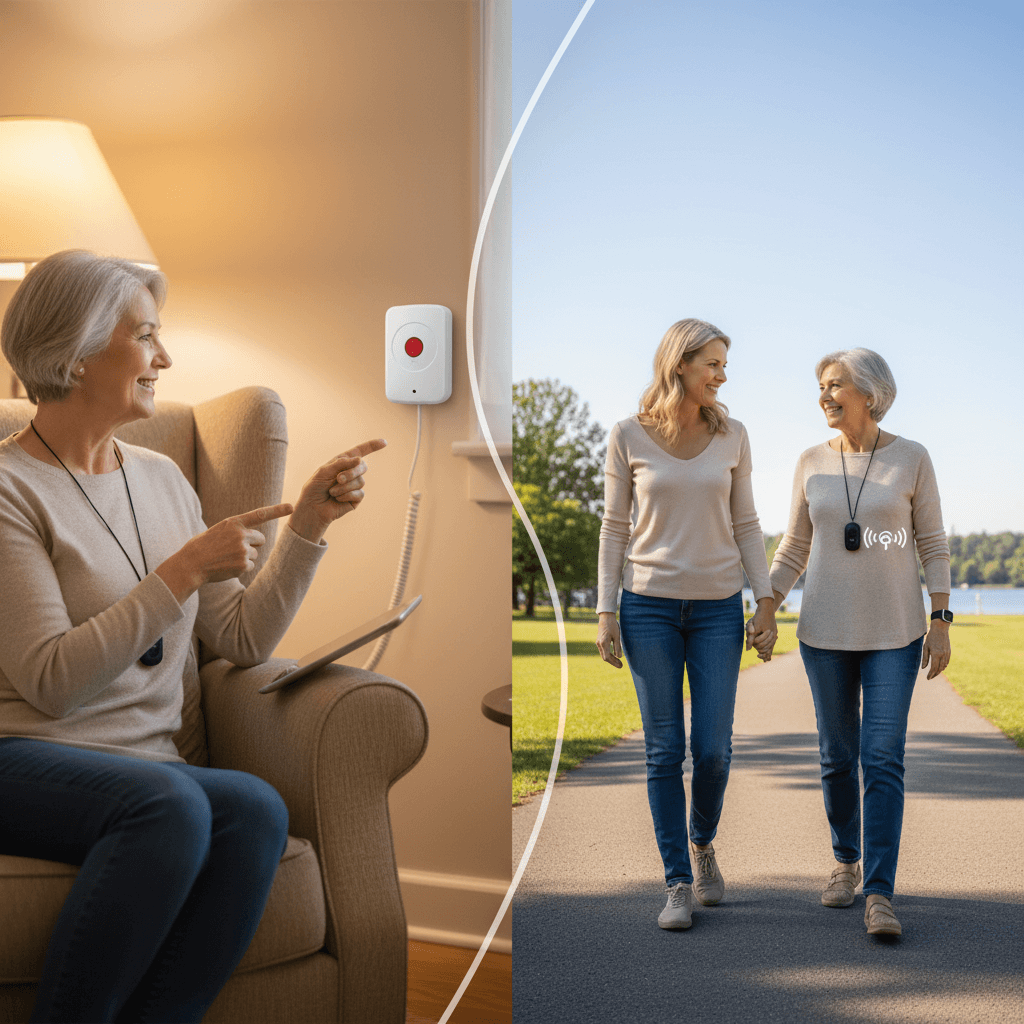
Seniors and their families face a big decision when choosing emergency protection for home and on the move. Picking between home-based and mobile medical alert systems changes how free daily life feels, how fast help arrives, and how much it costs. Clear differences come with real-life examples that make it easy to match what’s needed without confusing terms. This helps people find the right fit and avoid surprises. Keep reading to discover which choice keeps safety close and freedom intact.
We focus on practical factors such as coverage area, location tracking, battery life, costs, and real life scenarios. Read through specific tips that caregivers and older adults can apply when comparing plans and devices.
What in home and mobile medical alert systems are and who should consider each
In home medical alert devices are built around a base station that connects to a landline or home wireless network. They commonly include a wearable button that calls for help when pressed and sometimes fall detection. They work well when most of a person’s time is inside a residence.
Mobile medical alert systems use cellular networks and GPS for location. Wearable devices are smaller and designed to be carried or worn throughout daily activities. They are a fit for people who leave home regularly and want protection when walking outside, visiting friends, or running errands.
Primary differences in hardware and connectivity
Understanding the technical split helps set expectations about performance and limits. Many buyers choose based on how and where the device will be used.
Range and coverage details
In home systems work within a set distance from the base unit. That distance can vary from one model to another, with common ranges between 300 and 600 feet. Walls and building materials reduce range so coverage in a multistory residence may require testing.
Network connection and battery factors
In home units often rely on a home phone or Wi Fi. Power outages may reduce function unless the system has battery backup. Mobile units use cellular service and GPS so they continue working outside, though battery life is a major consideration. Expect to recharge mobile devices daily to every few days depending on usage and features.
Response options and user interaction
Response workflow is a key differentiator. Many systems route calls to a monitoring center staffed by trained operators. Some permit two way voice through the wearable itself which shortens the time to assess a situation. Other systems call preset contacts first which can be faster for familiar emergencies but may be less reliable if those contacts are unavailable.
Ask how many seconds it takes to connect, whether the operator can hear ambient sound, and if they can reach emergency services directly. Those details affect outcomes when a senior cannot speak or is unconscious.
Cost and billing considerations for seniors and families
Pricing has several components. Expect initial hardware charges, monthly monitoring fees, and possible setup or cancellation fees. Mobile plans that use cellular service may add a carrier fee. Compare total yearly costs rather than monthly numbers alone to get a realistic picture.
- Look for contracts and check how long you are committed
- Ask about price increases after an introductory period
- Factor in replacement batteries or wearable bands over time
Some providers offer no contract monthly plans that suit trial periods. Others provide discounts for multiple units in the same household which can help when spouses both want coverage.
Common daily living scenarios with device recommendations
Practical examples make it easier to match features to needs. Below are everyday situations and which type of system usually fits.
- Mostly at home and mobility limited. An in home system is often preferable because the base station covers most living areas and charging is simple
- Active routines that include walks or appointments. Mobile systems with GPS help responders find a person quickly outside the home
- People who worry about falls during sleep or bathroom use. Choose devices with reliable fall detection and two way voice
- Frequent travel including visits to relatives. Mobile systems work nationally and are better for temporary stays away from home
Example case study One woman lives alone and rarely leaves the apartment. She chose an in home unit with fall detection and voice monitoring through the base. A different person who walks a mile daily prefers a mobile unit with GPS and long battery life.
Health, safety, and technical limitations to check
All systems have limits that affect safety. Battery failures, poor signal in basements or rural areas, and false activations are common issues to verify before purchase.
Test a device in the actual environment where it will be used. Press the button from various rooms, check connection in the basement, and try walking a typical route to confirm GPS accuracy. If coverage is inconsistent, ask the provider about signal boosters or alternative models.
Fall detection accuracy and false alerts
Automatic fall detection is useful but not perfect. These sensors can miss low speed collapses or trigger when a wearer drops the device. Confirm how the monitoring center handles suspected falls. A quick live voice check can prevent unnecessary ambulance dispatches.
Privacy and location concerns
Discuss how location data is stored and who can access it. Mobile units transmit GPS coordinates to monitoring centers so check policies if privacy is a priority. Also ask about data retention and whether location history can be erased on request.
How to evaluate service quality and try before you buy
Service quality affects outcomes more than minor hardware differences. Use the following steps when comparing providers.
- Call customer support first and note hold time and helpfulness
- Request a trial period and read the fine print about returns
- Ask for real response time statistics and whether response staff are local or remote
- Read peer reviews and ask neighbors or local community centers for recommendations
Testing a device in real circumstances is vital. Run a mock emergency with the senior and record how long it takes to connect and the clarity of voice communication. If a system fails the test try a different provider before signing a long contract.
Decision checklist and tips for making the final choice
Use this checklist to guide conversations with providers and family members. Keep a written note of answers and compare them side by side.
- Where is most time spent Does the person leave home often
- Is fall detection required and how accurate does it need to be
- What are total yearly costs including extras
- How long is battery life and what charging routine will work
- Are there contract requirements or trial periods
- How does the monitoring center handle language preferences and emergency dispatch
When in doubt select a no committal monthly plan to test real use for several weeks. If the senior finds the wearable comfortable and the family feels confident in response times, a longer term plan may make sense. For combined needs consider pairing an in home unit with a small mobile button for trips outside so coverage is seamless.
For readers who want a detailed comparison and side by side feature list visit this resource on medical alerts for seniors which provides charts and real user reviews to support decision making.
Choosing between in home and mobile systems comes down to where protection is most needed and how much independence a senior wishes to maintain. Test devices in real settings, compare total costs, and involve the senior in the decision to respect preferences. If family caregivers are unsure start with a short term plan and collect data from mock tests to move forward with confidence.
Conclusion
Picking the right emergency alert system for an older adult is an important step toward safer daily life. In home units often suit those who spend most time at a residence while mobile units offer freedom outside with GPS location and cellular coverage. Evaluate battery life, connectivity, monitoring response, and total cost. Run live tests and keep a checklist of priorities so the choice fits actual routines. If you are still uncertain try a trial period and compare how the device performs during everyday activities. Take action by testing one system this week or contacting two providers for demo units. Having a plan in place reduces uncertainty during an emergency and helps seniors preserve independence with sensible protection.
 The Real Tech Driving Psychedelic Renaissance 2026
  Roof Safety Regulations for Singapore Construction and Maintenance Workers
  Medical Alerts That Work Without Landline Connections
  Handle a Dangerous Product Injury Case
  Your Air Conditioner Blowing Hot Air?
  City Living How To Thrive Financially And Achieve Goals